
Cold Email Deliverability: Placement Problem or Targeting Problem
A placement problem and a targeting problem produce the same symptom and need opposite fixes. How SPF, DKIM and DMARC actually work, why bounce rate measures neither, and the twenty minute test that separates them.
Your replies dropped. Nobody is answering. The obvious conclusion is that you have a deliverability problem.
Maybe. There are two completely different faults that produce that exact symptom, the fix for each one is the opposite of the fix for the other, and the instrument almost everybody reaches for cannot tell them apart.
The two faults
A placement problem is mechanical. The receiving server made a routing decision and your message went to spam, or to Promotions, or was rejected outright. The content was never judged by a human.
A targeting problem is editorial. The message arrived in the inbox exactly as intended. Someone read the subject line, and it was not for them.
From where you sit, both look the same: a number that used to be 4% is now 1%.
The fix for one is infrastructure. The fix for the other is the list. Doing the first when you needed the second is the most common wasted month in outbound.
I have watched a team spend three weeks on domain warm-up and authentication for a campaign whose real problem was that it was addressed to operations managers at companies that had no operations managers.
Why bounce rate tells you nothing
A bounce means the receiving server refused the message. Not bouncing means it accepted it.
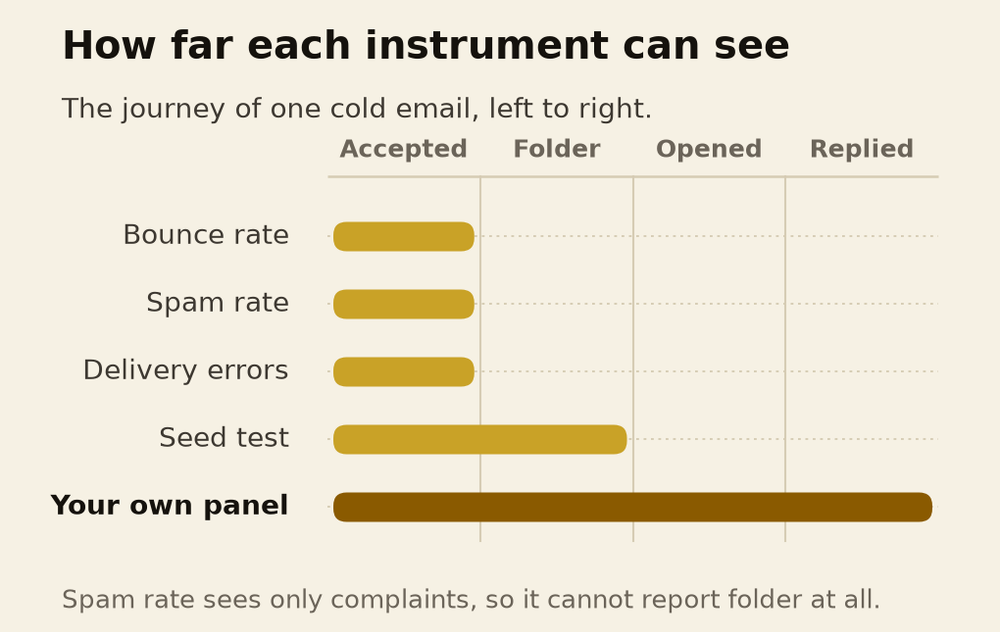
That acceptance is a `250` response in the SMTP transaction, and the specification is explicit that it carries no promise about what happens next. Servers are permitted to accept a message and bounce it later, and nothing in the protocol says anything at all about which folder the message lands in. Folder choice happens after acceptance, invisibly, at the receiver's discretion.
So a 2% bounce rate tells you the addresses exist. It is a list-hygiene number wearing a deliverability costume.
What the authentication stack actually does
This is where most published advice is not simplified, it is wrong. The three records do genuinely different things and almost every guide blurs them.
SPF publishes which servers are allowed to send for your domain. The receiver checks the connecting server's IP against that list. Critically, the domain it checks is the envelope sender, the `MAIL FROM` address, which is what lands in the Return-Path header. It does not check the From address your recipient reads. A message can pass SPF perfectly while displaying any From address at all.
SPF also has a limit people trip over constantly: evaluation must stop after 10 DNS lookups, and exceeding it returns a permanent error rather than a pass. Every `include:` in your record counts. Add a fourth tool to a stack that already has three and you can silently break authentication for everything.
DKIM signs the message cryptographically, so the receiver can confirm the signed headers and body were not altered in transit. The specification says the signing domain "is not required to match an address in any particular header field". So DKIM alone also does not prove the From address is genuine.
DMARC closes that gap. It passes when SPF *or* DKIM passes and the domain that authenticated aligns with the visible From domain. One aligned pass is sufficient. You do not need both, and the guides that say you do are wrong.
Then there is the part nobody quotes, which sits in the DMARC specification itself:
DMARC does not produce or encourage elevated delivery privilege of authenticated email.
Authentication removes a reason to distrust you. It does not give the receiver a reason to deliver you.
Two more things worth knowing. A policy of `p=none` still means DMARC is evaluated and reports are sent; it just asks the receiver to take no action. And receivers are not bound by your policy in either direction: they may reject mail that passes and accept mail that fails. The policy is a request, not an instruction.
One operational note if you are reading older guides. The DMARC standard was replaced in May 2026, when RFC 9989 obsoleted the 2015 specification. Among the changes, the `pct` tag that let you apply a policy to a percentage of failing mail has been removed.
The instrument that cannot see the thing you need
Google Postmaster Tools is the closest thing to an official window, and it is narrower than people assume.
It reports only on mail to personal Gmail addresses. It needs the domain verified. It goes blank on low-volume days to protect privacy. And it does not show folder placement at all. There is no screen anywhere in it that says what proportion of your mail landed in spam.
What it does show is spam rate, and here is the definition, from Google:
The spam rate is the percent of your messages that are delivered to engaged recipient's Inbox and then marked as spam by the recipient.
Read the denominator. Mail that Gmail filtered into spam before anyone saw it is not in that measurement. Spam rate is a complaint rate, and people do not complain about mail they never received.
So the single metric that sounds like it measures placement is structurally incapable of detecting the worst placement failure there is. A domain where nothing reaches an inbox can report a beautifully low spam rate.
That is an inference from Google's own definition rather than something Google states, and I am flagging it as one. But it is the reason a clean dashboard should never end an investigation.
How to actually separate them
You need an instrument that reads folders, and only two exist.
Seed testing means keeping test mailboxes across providers, sending to them, and recording which folder each message landed in. It is the standard method and it has real flaws that vendors are quiet about: seed accounts have no genuine engagement history, so they are filtered differently from a real recipient who has corresponded with you; one send is one snapshot; and providers may be able to identify seed accounts. I could not find a single controlled study measuring seed results against real recipient placement. Not one. For a method this widely sold, that absence is remarkable.
Your own panel is better and almost nobody does it. Real mailboxes you control at Gmail, Outlook and a hosted Workspace domain, with ordinary human history on them. Send the live campaign to them alongside the real list and open them.
Then run this sequence.
- Check the delivery errors dashboard first. Rejection codes are unambiguous. A `4.7.x` or `5.7.x` family code names the failure: PTR, SPF, TLS, DKIM, DMARC, From alignment. If those are clean, authentication is not your problem and you can stop reading infrastructure blogs.
- Check the authentication dashboard. Google notes that senders typically achieve 95% or better on DKIM and DMARC. Below that, fix it before touching anything else.
- Read your panel's folders. If your messages are in spam, it is placement. If they are sitting unopened in the inbox, it is targeting, and no amount of warm-up will help.
- Split the test by recipient type. If placement is fine at Gmail and poor at a particular corporate domain, you have a filtering appliance problem at one company, not a reputation problem.
- Compare across mailboxes on one domain. All bad means the domain. One bad means that mailbox. This is practitioner method with no documentation behind it, so treat it as a hypothesis generator rather than proof.
Catch-all addresses, and why a verifier shrugs at them
A catch-all domain accepts mail for any address at all, then sorts it out afterwards, instead of rejecting unknown recipients during the conversation.
That matters because of how verification actually works. A verifier does roughly this: check the syntax, look up the domain's mail servers, open a connection, name a sender, name your target recipient, read the reply, and hang up before sending anything.
The whole test is that reply. A `250` means accepted, a `550` means no such user. On a catch-all domain, every address returns `250`, including addresses that do not exist. The verifier then probes a deliberately random address at the same domain, sees it also accepted, and flags the whole domain as catch-all. Which is the honest answer: the test it has is not capable of telling you anything about that domain.
My standing rule on this is simple and I have not found a reason to soften it. Only `ok` is sendable. `catch_all` and `unknown` are not. One bounce on a cold domain costs more than a thousand verification credits.
One claim worth correcting while we are here. Several verification vendors assert that Gmail and Microsoft always return `250` to probes, so their mailboxes cannot be verified. Both providers' own documentation contradicts that: Microsoft publishes a `550 5.4.1` for a rejected unknown recipient, and Google publishes `550 5.1.1` for an account that does not exist. What both do is rate limit and block repeat probers, which is a different problem and the real source of unreliable results.
What my own numbers actually say
Across 44 campaigns for one client we sent 470,293 emails and got a 2.12% reply rate overall.
That number is not a deliverability result. I want to be precise about this, because the industry constantly presents reply rate as if it were.
A 2.12% reply rate is the product of placement and targeting multiplied together, and you cannot factor it from the outside. The campaigns inside that set that did well and the ones that did badly had the same infrastructure, the same authentication, the same domains, the same warm-up. What separated them was who was on the list and whether the first line could only have been written to that person.
When I see a reply rate fall, the first question is not what changed in the stack. It is what changed in the list.
The levers that are documented, and the ones that are not
This distinction is worth holding onto, because the gap between them is where most deliverability advice lives.
- Documented. Spam complaints lower domain reputation over time. A recipient marking a message "not spam" improves future delivery to them. Mail from an address in the recipient's contacts is less likely to be filtered. Sudden volume spikes can cause rate limiting or reputation drops.
- Documented and inconvenient. Google states that it does not track open rates and that low open rates are not necessarily an indicator of a spam classification problem. Any advice built on improving your open rate to fix placement at Gmail is built on something Google says it cannot see.
- Not documented by anyone. Reply rate as a placement signal. No mailbox provider publishes it anywhere I could find.
I suspect replies do help. I cannot show you a source, and a guess is what it is.
What to do on Monday
- Classify the fault before you fix anything. Pull the delivery errors dashboard, then read actual folders in mailboxes you control. Twenty minutes.
- If the codes are clean and the mail is in inboxes, stop working on infrastructure. You have a list problem, and warm-up tools do not fix lists.
- Count your SPF lookups. Ten is a hard ceiling and a fourth sending tool is the usual thing that breaks it.
- Check DMARC alignment, not just presence. A published record that nothing aligns to is not authentication.
- Send only to `ok` addresses. Catch-all is not a maybe, it is an absence of information.
- Stop reading a low spam rate as a clean bill of health. It measures complaints from people who received your mail, which is the population you are worried about not existing.
The uncomfortable part is that targeting failures are more common than placement failures, and far less fun to fix. Plenty of companies will sell you a list. None of them can sell you the decision about who you are for, and that decision is what makes a list good.
That one you have to make yourself.

Ahmad Zabir
GTM expert and marketing consultant for SaaS companies, software houses and fitness brands. He diagnoses why growth stalls, designs the fix, and trains the team to run it.
One teardown a month
Research like this, before it goes public. No cadence promises I will not keep.
Cold Email vs LinkedIn: What the Numbers Actually Say
Most comparisons divide LinkedIn replies by accepted connections and email replies by emails sent, which rigs the result. Corrected per prospect, the gap is under two times, and the same audience data says the channels reach different people.
Do Cold Emails Still Work in 2026
Published cold email reply rates range from 0.45% to 4.5% for the same channel in the same year. The gap is almost entirely arithmetic, not performance, and one agency moved its own number thirteen times by changing the denominator.
How Many Cold Emails You Can Send Per Day, Per Domain
No mailbox provider publishes a safe cold email volume. What Google and Microsoft actually document, why the published vendor caps disagree by eight times, and how to tell which of your domains is actually burned.
What Is a GTM Agency, and What It Is Not
A GTM agency owns the whole path from product to collected cash, across positioning, demand, sales and revenue operations. How that differs from a marketing agency, a sales strategy and revenue operations, the four ways it breaks, and when you actually need one.
Not sure which of these you actually need?
Bring your funnel and your numbers. You leave knowing what to fix first and what to ignore.
Apply for a Consult