
How Many Cold Emails You Can Send Per Day, Per Domain
No mailbox provider publishes a safe cold email volume. What Google and Microsoft actually document, why the published vendor caps disagree by eight times, and how to tell which of your domains is actually burned.
Fifty.
That is the number almost everyone will give you, and almost nobody can tell you where it came from. I went looking for the source. There isn't one.
What the providers actually document
Start with the only numbers anyone is obliged to honour.
Google Workspace caps a user at 2,000 messages per rolling 24 hours. But look further down the same page and the limit that actually binds cold outreach is different: 2,000 unique external recipients per day, inside a cap of 3,000 external recipients total. Trial accounts get 500, and those limits do not rise until the domain has cumulatively paid at least $100, which Google says can take up to 75 days.
Microsoft 365 caps a mailbox at 10,000 recipients per day and 30 messages per minute.
Then Microsoft says this, in its own service documentation:
Exchange Online isn't suited to accommodate bulk-mailing scenarios.
That is Microsoft telling you that what you are doing sits outside the documented use case of the product you are doing it with. Not a warning about volume. A statement about fit.
Neither number is deliverability guidance. They are abuse quotas. Hitting them gets you blocked for 24 hours. Staying under them guarantees nothing at all, which is the part the advice industry skips.
The one per-domain number Google publishes
There is exactly one, and it is not a sending cap.
Since February 2024, a sender pushing roughly 5,000 or more messages per 24 hours to personal Gmail addresses is a bulk sender, and has to meet a harder set of requirements: SPF and DKIM and DMARC, From-domain alignment, one-click unsubscribe, and a spam rate Google wants below 0.10% and says should never reach 0.30%.
Two details inside that rule matter more than the number itself, and I have never seen either one in a blog post about sending limits.
Subdomains roll up. Google's own example: 2,500 messages from `solarmora.com` plus 2,500 from `promotions.solarmora.com` counts as 5,000. So the common trick of spinning up sending subdomains under one root does not divide your volume in Google's eyes. Separate root domains do. If you are buying infrastructure to stay under a threshold, you are buying the wrong thing unless you are buying different roots.
It is a one-way door. Google's wording is that senders who meet the criteria at least once are *permanently* considered bulk senders. One heavy week in March reclassifies you for good.
And the reason this matters more than a threshold: reputation attaches to the domain, so cold volume sent from the domain your staff email on can drag your staff email down with it. If invoices and support replies started landing in spam after someone ran a campaign, that is the mechanism, and no amount of warm-up on the main domain fixes it while the cold sending continues. Move cold outreach to its own root domain and keep it there.
Also worth knowing: the 5,000 counts only mail to personal Gmail. Workspace recipients do not count toward it. And Yahoo, which gets lumped into the same sentence constantly, publishes no threshold at all. Its own FAQ says it will not specify a volume.
What the vendors say, and why you should stop asking them
I pulled the published daily-send recommendation from every major cold email tool I could reach.
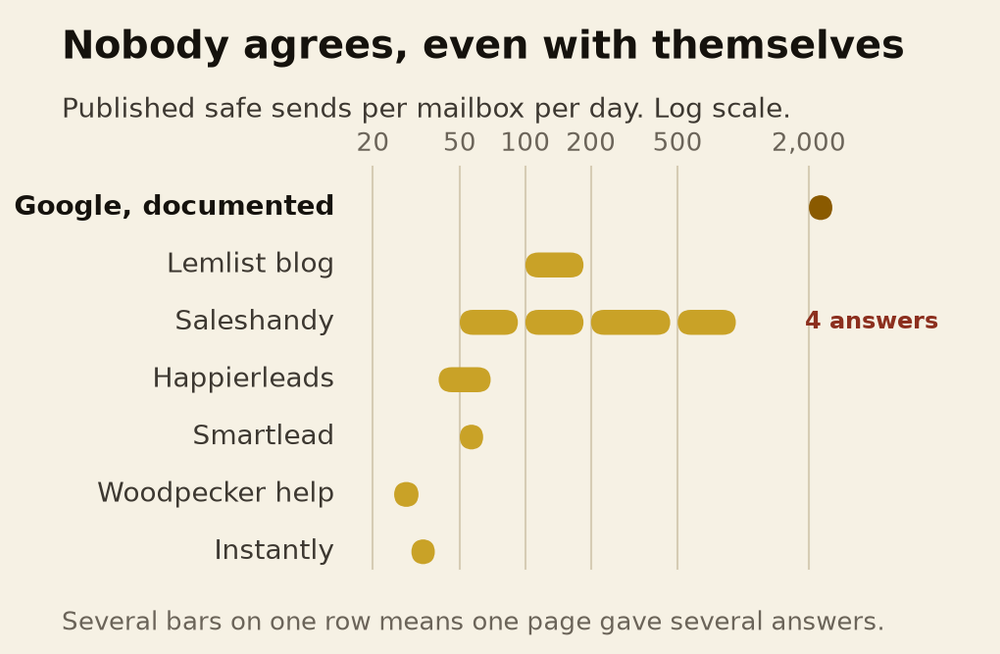
The spread for a warmed-up mailbox runs from 25 to 200. That is a factor of eight, for the single most basic question in the category.
It gets worse inside individual sources.
Saleshandy's guide gives four different answers on one page. Established domains: 50 to 100 in the summary table, 100 to 200 in the FAQ, 200 to 500 in section two, and 500 to 1,000 in section four. Its new-domain starting volume appears as 5 to 10, 10 to 20, and 20 to 50 in different places. Its bounce threshold is under 5% in one spot and under 2% in another.
Lemlist's blog and its own help centre disagree. The blog says keep each inbox at 100 a day as the default, rising to 150 to 200 after warm-up. The help centre caps a mailbox at 25 to 30 per day with a total ceiling of 50 including warm-up. Same company, both live.
QuickMail contradicts itself across two pages updated the same day. Week three of warm-up is 20 emails on one, and 40 to 60 on the other.
To be fair to Lemlist, it is the only one that says the quiet part out loud. Its blog carries this disclaimer:
These are our numbers based on what we see across lemlist accounts, not a rule any provider publishes.
That is the honest position, and it should be the headline rather than a footnote.
The number nobody quotes
Smartlead publishes a benchmark page built on more than 850 million emails sent through its platform, counting only senders who sent at least 500 in the period.
The median mailbox sends 14 cold emails a day. The middle half sits between 8 and 24. You need to be in the top 10% of senders on that platform to pass 42.
Set that against the same company's advice elsewhere on its own site, which is a cap of 50 and a warning that above 50 you are in the danger zone.
The number being recommended is roughly three and a half times the number anyone is actually sending.
I do not think that is dishonesty. I think it is what happens when advice is written from intuition and benchmarks are written from logs, by different people, and nobody reconciles them.
What I actually did
On one client we sent 470,293 emails across 44 campaigns. The overall reply rate was 2.12%, and 16.6% of those replies were positive.
At a different client the daily volume ran at roughly 20,000, though that figure is the client's own reporting and I have no export to back it, so treat it as their number rather than mine.
Here is what carried across both, and it is not a cap.
Volume was never the lever. The thing that moved results was how narrow the list was and how specific the first line could be, and those two are the same decision made twice. A narrower list means you can say something only that list would recognise. When we widened a list to hit a volume target, reply rate fell faster than volume rose, every time.
So the honest version of the per-day question is: how many people can you write to this week who would recognise themselves in the first sentence? Send that many. That number is usually embarrassingly small at the start, and it is the only number in this article derived from your business rather than someone's product.
How to tell which domain is actually burned
This is the question people really have, and almost nothing published answers it.
Google Postmaster Tools is per domain, not per mailbox. It reports only on mail to personal Gmail addresses, only for domains you have verified, and it goes blank on low-volume days to protect privacy. It does not show folder placement. So it will tell you that something is wrong with a domain and will not tell you which of your six mailboxes caused it.
There is one documented way to slice below the domain, and hardly anyone uses it. Gmail's Feedback Loop lets you stamp a `Feedback-ID` header on outgoing mail with identifiers you choose. Put a mailbox or campaign ID in that field and Gmail will report spam complaints against it separately. It only covers Gmail recipients, and it only starts reporting once a given identifier crosses a volume and complaint threshold Google does not publish. It is still the only per-stream view that exists.
Now the part that genuinely surprised me.
Google defines spam rate as the percent of your messages delivered to an engaged recipient's inbox and then marked as spam.
Read that denominator again. Mail that Gmail already filtered into spam is not sitting in the numerator. So a mailbox so badly burned that nothing reaches an inbox can report a low spam rate, because a spam rate is a complaint rate and nobody complains about mail they never saw.
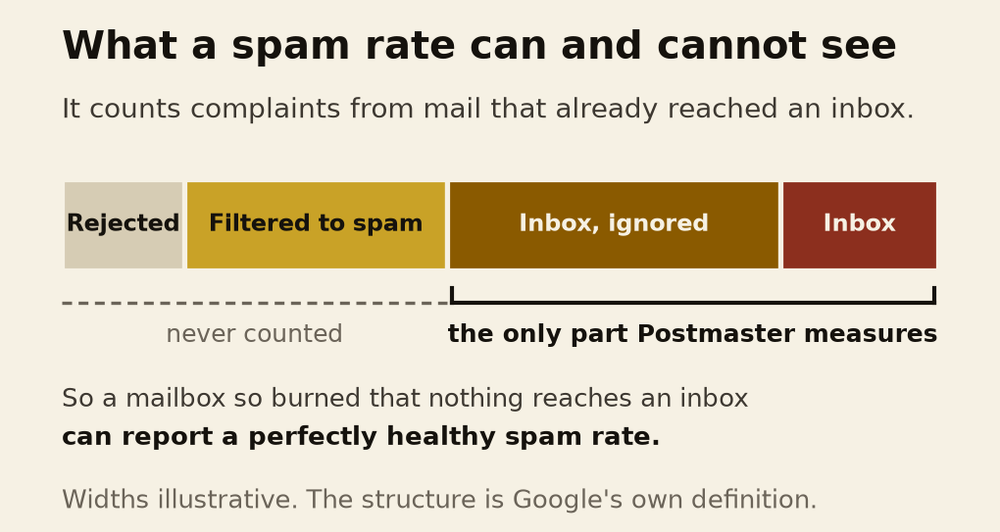
Google does not spell that out. It is an inference from their own definition, and I am labelling it as one. But it means a clean-looking dashboard is not evidence of a healthy domain. It is evidence of one of two very different things, and you cannot tell which from that screen alone.
Recovery, and what is actually known about it
Vendors will tell you a burned domain takes 2 to 4 weeks, or 4 to 8 weeks, or 3 to 6 months, or more than 6 months. Those are four different published claims for the same state. Not one of them carries a method or a sample size, and several come from companies that sell replacement domains.
Google publishes exactly one timing rule: bulk senders become eligible for mitigation once their spam rate stays below 0.3% for 7 consecutive days. Above 0.3% you are ineligible, and if you do not meet the sender guidelines at all, Google says it will not provide mitigation.
Note the scope. Mitigation is a bulk-sender process, so a smaller cold sender is probably outside that channel entirely. That reading is mine, not Google's.
Can you keep sending while recovering? Google never says pause. What it says is to start with low volume to engaged recipients and increase slowly, and that a sustained high spam rate leads to increased spam classification. Those two together mean continuing at the volume that caused the problem is directly against the published guidance, and continuing at a much lower volume to people who actually reply is not.
Three things that are documented, and one that is not
Worth separating, because the whole category blurs them.
- Documented. User spam reports lower domain reputation over time. Marking a message "not spam" helps future delivery. Sudden volume spikes can cause rate limiting or reputation drops, and Google specifically warns against doubling volume suddenly.
- Documented, and awkward for the industry. Google states plainly that it does not track open rates, and that low open rates are not necessarily an indicator of a spam classification problem.
- Not documented anywhere. Reply rate as a placement signal. No mailbox provider publishes it. Gmail lists replies as an input to its *importance* marker, which is the Priority Inbox feature, not spam filtering. Every vendor claim that replies improve placement appears to be an extension of that page.
I think replies probably do matter. I have no basis for saying so beyond that it would be strange if they did not, and that is exactly the kind of reasoning this article is arguing against.
So what do you send
- Work backwards from Google's 2,000 unique external recipients, not from a blog's number. That is a real ceiling with a real error message behind it.
- If you need to be under 5,000 a day to Gmail, buy separate root domains. Subdomains of one root do not split the count.
- Assume the published caps are folklore and treat them as a range, not a rule. When eight sources disagree by eight times, none of them knows.
- Stamp a Feedback-ID per mailbox before you need it. You cannot diagnose a burn retroactively without one.
- Do not read a low spam rate as health. Check it against whether anyone is replying at all.
- Let the list set the volume. Send to the number of people you can write a specific first line for, which is the only constraint here that comes from your business.
The reason there is no published number is that the question has no general answer. A thousand a day to people expecting you is fine. Fifty a day to a scraped list is not.
Nobody can sell you a number that knows the difference.

Ahmad Zabir
GTM expert and marketing consultant for SaaS companies, software houses and fitness brands. He diagnoses why growth stalls, designs the fix, and trains the team to run it.
One teardown a month
Research like this, before it goes public. No cadence promises I will not keep.
Cold Email vs LinkedIn: What the Numbers Actually Say
Most comparisons divide LinkedIn replies by accepted connections and email replies by emails sent, which rigs the result. Corrected per prospect, the gap is under two times, and the same audience data says the channels reach different people.
Do Cold Emails Still Work in 2026
Published cold email reply rates range from 0.45% to 4.5% for the same channel in the same year. The gap is almost entirely arithmetic, not performance, and one agency moved its own number thirteen times by changing the denominator.
Cold Email Deliverability: Placement Problem or Targeting Problem
A placement problem and a targeting problem produce the same symptom and need opposite fixes. How SPF, DKIM and DMARC actually work, why bounce rate measures neither, and the twenty minute test that separates them.
What Is a GTM Agency, and What It Is Not
A GTM agency owns the whole path from product to collected cash, across positioning, demand, sales and revenue operations. How that differs from a marketing agency, a sales strategy and revenue operations, the four ways it breaks, and when you actually need one.
Not sure which of these you actually need?
Bring your funnel and your numbers. You leave knowing what to fix first and what to ignore.
Apply for a Consult